How to Download Vimeo Videos From Any Page Type
Download Vimeo videos from public pages, private links, password-protected players, embeds, and review pages.
If Vimeo shows its own Download button, use that first. Otherwise, open the page where the video plays, press play, open the SERP Vimeo Video Downloader, choose an available quality, and save the MP4.
The page matters because Vimeo videos can be public, password-protected, private, embedded on another website, or shared through a client review link.
Quick method by page type
| Vimeo page | Best starting point |
|---|---|
| Your own Vimeo upload | Vimeo’s built-in Download button |
| Public video without Download | Open it, play it, use the extension |
| Password-protected video | Enter the password, play, use the extension |
| Private or team video | Stay signed in on the page that plays it |
| Embedded player | Use the extension on the containing page |
| Client review link | Open the exact review page and confirm the current cut |
| Showcase | Open each selected video individually |
Use Vimeo’s Download button when available
Open the video page and look below the player or in its menu. If the owner enabled downloads, Vimeo may show one or more original download choices.
This is normally the cleanest method for your own uploads and review files where the owner has enabled it.
Use the extension when the player works but no button appears
- Open the exact page containing the video.
- Sign in or enter the password when required.
- Press play and wait for the picture.
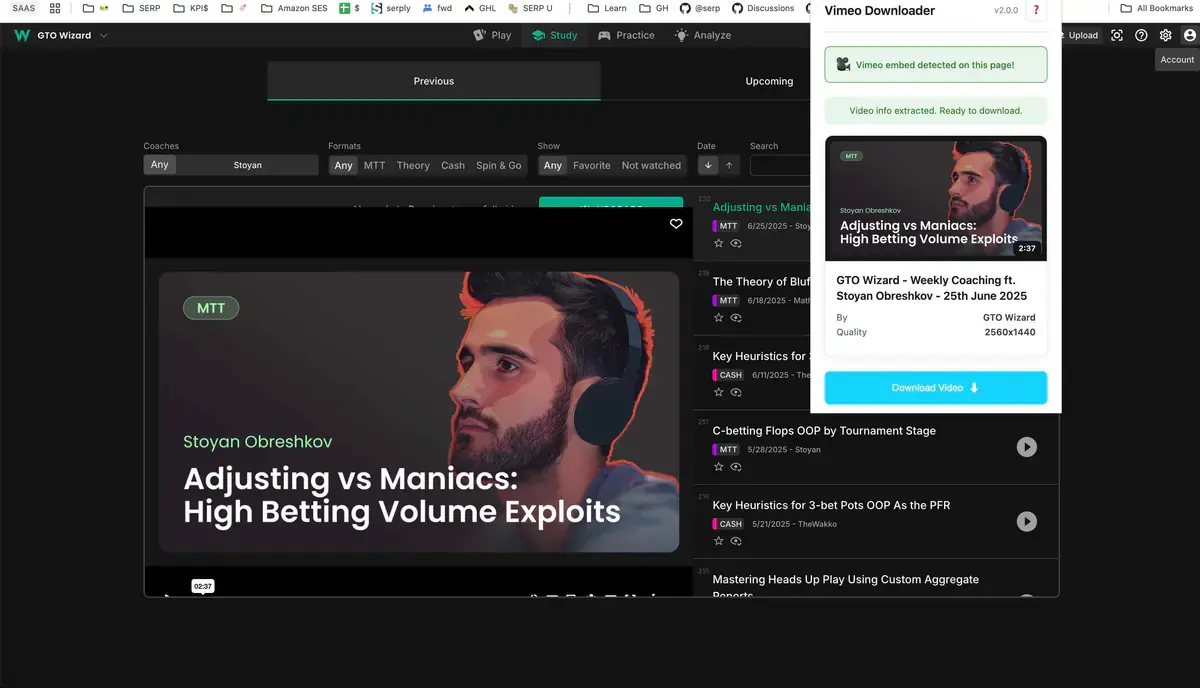
- Open the extension.
- Confirm the title or thumbnail.
- Choose a quality.
- Start the download.
- Keep the page open until the file completes.
The finished file appears in a dedicated Vimeo folder under your browser’s Downloads location.
Public Vimeo videos
Open the individual Vimeo page rather than a search result or profile grid. Play the video, open the extension, and select from the options Vimeo provides for that upload.
If the owner enabled Vimeo’s own Download button, there is no reason to ignore it.
Password-protected Vimeo videos
Enter the password in the Vimeo player first. Confirm the unlocked video plays, then open the extension in that same tab.
Do not paste the locked link into another website and expect it to know the password or remember the unlocked page. The password-protected Vimeo guide has the full sequence.
Private and team videos
Use the browser profile and Vimeo account that can already view the video. Confirm normal playback before opening the extension.
A private link does not make a video public. It only works for the account, team, or page that has access. See how to download private Vimeo videos.
Embedded Vimeo players
For a Vimeo player inside a portfolio, course, membership area, or client portal, use the extension on the page containing the player. Press play first.
If several players appear on one page, work with one at a time and compare the title and thumbnail. Use the embedded Vimeo guide for difficult pages.
Choose a sensible quality
1080p is useful for presentations and detailed screen recordings. 720p is a good balance for general offline viewing. Choose 4K only when the video offers it and you need the extra detail.
The extension cannot create a higher-quality version than Vimeo supplies for that upload.
Verify the saved file
Check:
- the correct video or review cut;
- picture and sound;
- complete beginning;
- seeking near the middle;
- complete ending;
- duration close to the Vimeo player.
For long videos, test several points before closing the page.
If no video is detected
Reload the page, unlock or sign in again if required, press play, and reopen the extension. Close unrelated Vimeo tabs if the wrong title appears.
The Vimeo downloader troubleshooting guide separates missing-player, quality, progress, and file problems.
A reliable Vimeo routine
| Step | What to confirm |
|---|---|
| Access | The video plays on the current page |
| Identity | Correct title, thumbnail, or review cut |
| Quality | Useful available resolution |
| Download | One clear job is running |
| File | MP4 has full picture, sound, and duration |
Begin with the page-type row that matches your video, then use the SERP Vimeo Video Downloader on one verified file before starting additional jobs.
Related products
Tools that directly support the workflow covered in this article.
Save password-protected and private Vimeo videos directly to your computer for offline editing and reference.
Not a tool for your own camera: this AnyWebcam downloader records the live public shows streaming on anywebcam.com.
AnyWebcam.org promises real people on webcams. Keep the unscripted public moments you catch there as MP4 files.
Read more
View all posts →Jul 30, 2026
How to Download a Password-Protected Vimeo Video
Download a password-protected Vimeo video after unlocking it in the player, choosing a quality, and verifying the file.
Read articleJul 30, 2026
How to Download YouTube Videos to Your Computer
Download YouTube videos from the watch page, choose an available quality, and save the completed file to your computer.
Read articleOct 23, 2025
How to Download TikTok Videos to Your Computer
Download TikTok videos on a PC or Mac with a browser extension that adds a download button directly to supported TikTok video posts.
Read article