01
Open Twitter/X
Go to the Twitter/X page with the video you want to save and let it load normally in your browser.
Download any video on your Twitter/X timeline with a single click using inline buttons that appear automatically.
Twitter/X Downloader adds a discreet download button to every video you encounter while browsing. The button appears right on the video, so you never need to leave the page or copy links to third-party sites. It's the fastest way to grab content you want to keep.
Each download fetches the highest available bitrate, ensuring you get the best possible quality from Twitter's own CDN. Real-time progress tracking shows speed, file size, and estimated time remaining, while auto-generated filenames include the tweet author and post ID for easy sourcing later.
The entire process stays inside your browser using your active Twitter/X session. No credentials are stored or transmitted, and there's zero server involvement, so your privacy is protected and downloads happen directly.

Secure checkout. Start downloading in minutes.
Trusted by 40k+ SERP Apps users.
Private downloads. No ads or tracking.
Part of the SERP Apps Extensions Library.
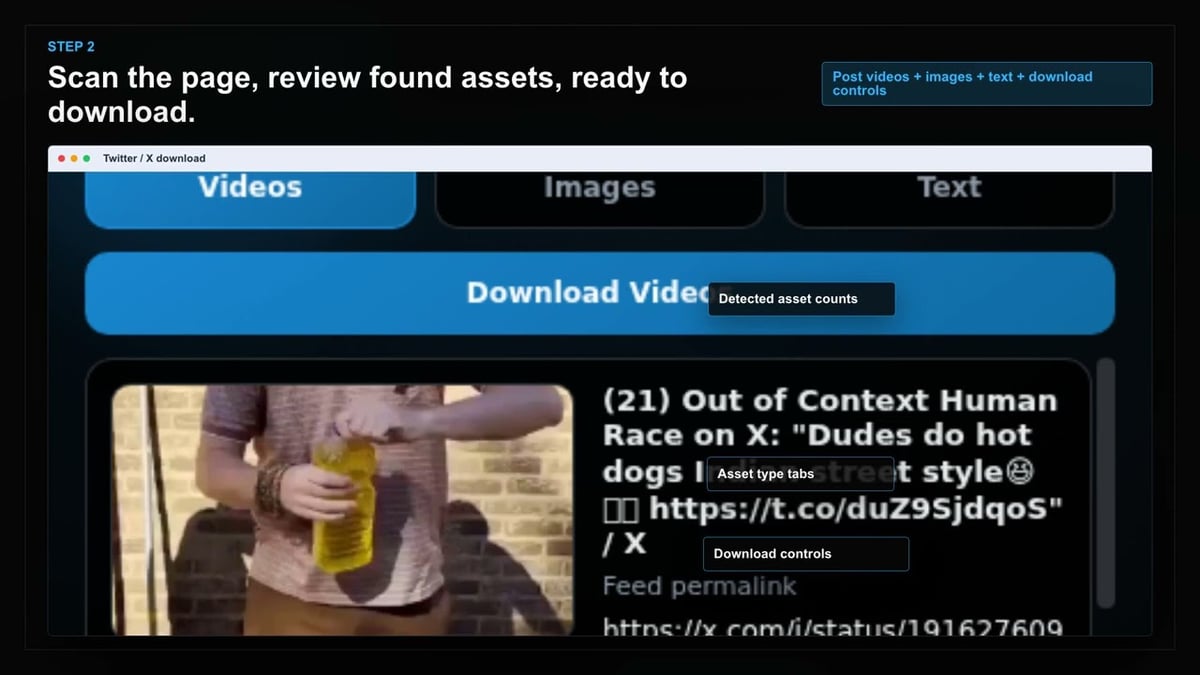
Open the page, let the extension detect what is available, and save the file to your computer.
Go to the Twitter/X page with the video you want to save and let it load normally in your browser.
Open the extension so it can find the available video source and show the download option for the current page.
Pick the available file option you want and save the finished video directly to your device.
Short, practical feedback from people using Twitter/X Downloader in real workflows.
I cover breaking news and tweets vanish constantly. This grabs the video in seconds and the filename includes the tweet ID so I can usually reference the source. Indispensable for my workflow.
Malik Jefferson
2025-02-05
The GIF-to-MP4 feature alone sold me. Those autoplay loops on Twitter are actually huge files and this saves them as tiny MP4s. Way better than any online converter I have tried.
Sophie Brennan
2025-03-01
Batch mode on a profile's media tab is the real star. Select everything, queue it, walk away. Came back to a neatly organized folder of clips. No duplicates, no misses.
Kenji Watanabe
2025-01-28
These comments and ratings were collected during our July 2026 customer survey and reviewed against support records before publication.
Core capabilities included in Twitter/X Downloader.
Save videos from Twitter/X directly to your device with a straightforward download process.
While watching a video on Twitter/X, the downloader becomes readily accessible.
The extension toolbar popup offers another convenient way to reach the downloader.
It automatically targets the video that is currently open in your browser tab.
Downloads use your browser’s built-in download manager for familiar handling.
You can monitor download progress right in the browser’s download list.
Files are saved into a dedicated Twitter X folder to keep things organized.
It works with the video source that the site uses, no technical format knowledge needed.
A completed download is stored as a local video file, playable without extra steps.
Finished files are easily opened from your browser’s downloads folder.
Downloaded videos stay on your device for offline viewing whenever you want.
The tool keeps your focus on the current Twitter/X page and the video you’re watching.
The extension shows the video source the page uses; online tools may present inconsistent format lists.
Twitter/X Downloader
Works directly with the video source Twitter/X provides.
Online Downloader Website
Some sites re‑encode the video, changing resolution or size.
Twitter/X Downloader
One straightforward download option per open video.
Online Downloader Website
A results page can show multiple confusing download buttons.
Twitter/X Downloader
No technical format knowledge needed.
Online Downloader Website
Format labels on an external page may be unfamiliar.
Twitter/X Downloader
Saved as a local video file, playable immediately.
Online Downloader Website
A few free tools add watermarks or extra conversion steps.
Twitter/X Downloader
Available from the current Twitter/X page you’re watching.
Online Downloader Website
Leaving the page to paste a link adds unnecessary friction.
Twitter/X Downloader
Stays in your browser—no separate uploads.
Online Downloader Website
You submit the tweet’s page address to another service.
Available on major desktop browsers and operating systems used in day-to-day workflows.
Pick the browser build you need. When a direct GitHub release is available, you can grab the ZIP there.
Open the latest GitHub release to download the Chrome build.
Firefox support is in progress and will be enabled soon.
Open the latest GitHub release to download the Edge build.
Open the latest GitHub release to download the Opera build.
Open the latest GitHub release to download the Brave build.
Open the latest GitHub release to download the Whale build.
Open the latest GitHub release to download the Yandex build.
Install from GitHub releases or your user dashboard. ZIP builds include the full desktop extension.
Every requested permission and the job it performs inside the extension.
Saves Twitter/X video files to your local downloads folder as MP4.
Scans the current Twitter/X page to detect embedded videos and display download controls.
Stores license key, quality preferences, and download history locally between sessions.
Sends desktop alerts when video downloads complete or encounter errors.
Better to know the boundaries up front than find out after checkout.
Cannot access videos from protected accounts without an authorized follow relationship
Twitter Spaces audio recordings are not supported
Photo downloads are not included — video and GIF content only
Available quality depends on what Twitter serves for each video
Safari and mobile browsers are not supported
Browser tab must remain open during active downloads
Keep exploring
Browse every category we support and jump directly into the tools that match your workflow.
23 categories are currently available.
Immediate Access
Product access begins after a successful checkout
Setup Guidance
Installation steps are provided for the supported package
Billing Shown Upfront
Review the selected billing interval before checkout
Preserve important Twitter/X videos before deletions, suspensions, or platform changes erase them.
Skip unreliable third-party converter websites and their intrusive advertising.
Maintain a searchable offline archive with auto-named files linked back to original tweets.
Download GIFs as lightweight MP4 files that play everywhere without bloated file sizes.