AI Voice Cloner App
Clone any voice from a 3-second sample and generate speech 5-10x faster than real time.
Browser extension
Current-page workflow
Browser downloads
40,000+ SERP Apps users
Try it free — 3 downloads, no credit card
Your downloads never touch our servers
No ads, no tracking, no analytics
One-time payment, lifetime updates
Works on Windows, Mac, and Linux
Email support, answered by the people who built it
About AI Voice Cloner App
Stop waiting for cloud rendering. The AI Voice Cloner App runs entirely on your desktop, using CPU or NVIDIA GPU acceleration to produce speech 5-10x faster than real time. Import WAV, MP3, FLAC, or M4A files, or record directly in the app, and create a voice clone from just 3-30 seconds of clean audio.
A guided trimming workflow with Fast, Balanced, and High Quality presets helps you get the best possible model in minutes. Once trained, you can generate hours of dialogue without recurring character fees. Use the batch text list feature to process multiple lines at once, and refine output with the pronunciation editor for consistent results.
Add pauses, breathing, and emphasis to make the narration truly engaging. Export your work as high-quality MP3, WAV, or OGG files, all without relying on cloud services. You own 100% of your projects, stored locally with optional encrypted, password-protected models for extra security.

Trusted at scale
Trusted by 40k+ SERP Apps users.
Private & local
Private downloads. No ads or tracking.
One connected library
Part of the SERP Apps Extensions Library.
Happy Users
Recent customer feedback
Short, practical feedback from people using AI Voice Cloner App in real workflows.
Pro-grade voices without the cloud
Training a voice takes five minutes on my RTX laptop and everything stays stored locally. It is the fastest workflow I have tested.
Morgan Ellis
2025-02-25
Ideal for accessibility projects
We build custom voices for assistive devices and the consent tools plus offline storage make compliance so much easier.
Dana Alvarez
2025-03-06
Creator friendly pricing
The one-time licence lets me experiment endlessly, and when I need commercial rights the Pro upgrade is right there. Quality is shockingly natural.
Quentin Price
2025-01-30
These comments and ratings were collected during our July 2026 customer survey and reviewed against support records before publication.
Features
Everything it does
Core capabilities included in AI Voice Cloner App.
Neural voice analysis will build a clone from a short 3–30 second sample.
You can import WAV, MP3, FLAC, M4A or record straight into the desktop app.
A guided trimming workflow includes Fast, Balanced, and High Quality preset options.
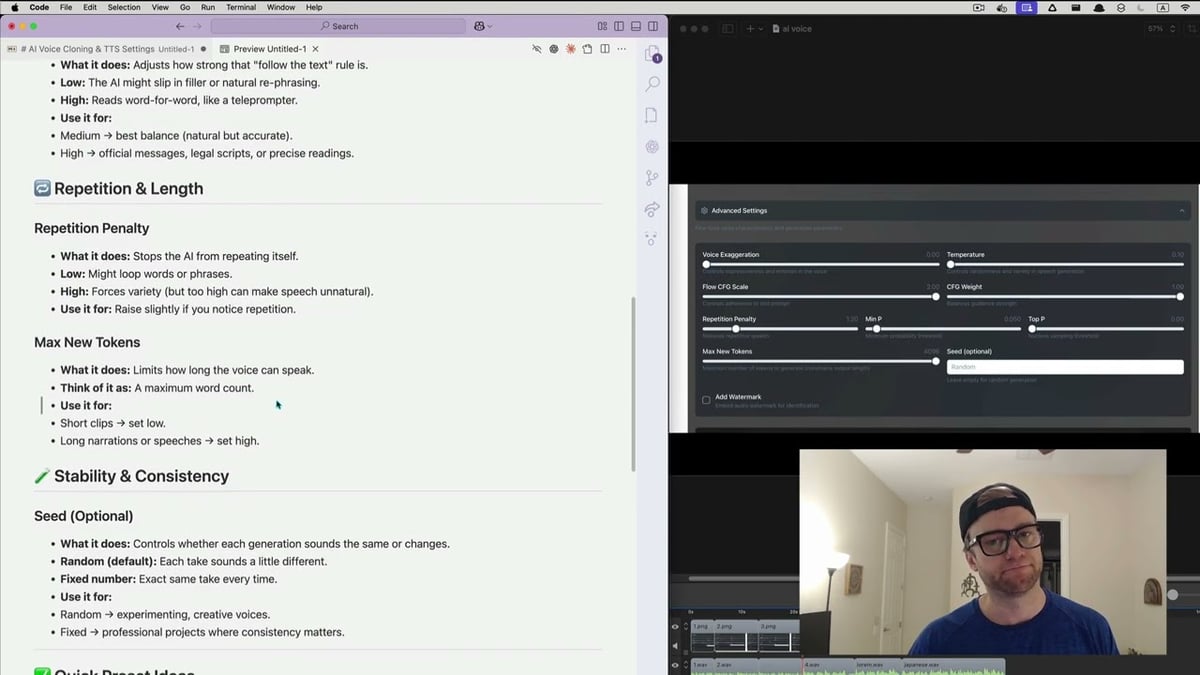
Speech generation is designed to run 5–10x faster than real time with pitch and speed sliders.
Pauses, breathing, and emphasis can be added so narration sounds more natural.
Batch text lists and a pronunciation editor are intended to support consistent dialogue.
Models are stored locally first, with optional encrypted password-protected storage available.
Invisible watermarking and consent verification are planned as ethical-use safeguards.
The app will work on Windows, macOS, and Linux using CPU or NVIDIA GPU acceleration.
High-quality MP3, WAV, or OGG exports will not rely on any cloud services.
Train new voice models in under 10 minutes using clean audio samples.
You will own 100% of your projects because storage and processing remain local-first.
Compare
AI Voice Cloner App vs Online Voice Cloners
Compare the AI Voice Cloner App's planned choices with the workflow of visiting a separate online voice cloner.
AI Voice Cloner App (planned)
Online voice cloner website
AI Voice Cloner App (planned)
Trim samples with Fast, Balanced, or High Quality presets
Online voice cloner website
Processing quality often depends on the site's fixed settings
AI Voice Cloner App (planned)
Add pauses, breathing, and emphasis for natural narration
Online voice cloner website
Some sites offer little control over voice delivery
AI Voice Cloner App (planned)
Batch text lists for consistent dialogue generation
Online voice cloner website
Batch processing may be unavailable on many online tools
AI Voice Cloner App (planned)
Pronunciation editor supports jargon and specialty terms
Online voice cloner website
Pronunciation tuning depends on the specific site
AI Voice Cloner App (planned)
Export WAV, MP3, or OGG without cloud reliance
Online voice cloner website
Output formats can vary between different websites
AI Voice Cloner App (planned)
Local-first storage means you keep project ownership
Online voice cloner website
Some free sites may show ads or redirects during use
Compatibility
Works where you work
Available on major desktop browsers and operating systems used in day-to-day workflows.
Operating Systems
windowsmaclinux
Transparency
Extension permissions explained
Every requested permission and the job it performs inside the extension.
Enables direct recording inside the app so you can capture clean source samples without leaving the cloning workflow.
Required to save voice models, project files, and exported audio in your chosen folders and to reopen them later.
Optional connection used for cloud acceleration, licence validation, and downloading model updates when you request them.
Lets the desktop app preview generated speech so you can review pronunciation, pacing, and emphasis before exporting.
FAQ
Common questions
You will start a new project, upload or record a clean 3–30 second sample, trim the best segment with the guided workflow, pick a training preset, and let the app build the model. Training is expected to finish in under 10 minutes.
Helpful reading
Posts
How to Download MKV Matroska Videos
File Extensions: .mkv, .mka, .mks MIME Types: video/x-matroska, audio/x-matroska Container: Open-source multimedia container Codecs: Any codec (H.264,...
Devin Schumacher

vimeo
video-download
private-video
How to Download Vimeo Videos From Any Page Type
Download Vimeo videos from public pages, private links, password-protected players, embeds, and review pages.
Devin Schumacher
How to Download MP4 Videos
File Extensions: .mp4, .m4v, .m4a MIME Types: video/mp4, audio/mp4 Container: Multimedia container Codecs: H.264, H.265, AAC, and many others
Devin Schumacher
Keep exploring
Product categories
Browse every category we support and jump directly into the tools that match your workflow.
23 categories are currently available.
Downloader · 1328 productsVideo Downloaders · 1180 productsAdult · 1053 productsImage Downloaders · 46 productsCreative Assets · 39 productsCourse Platforms · 31 productsMovies & TV · 31 productsSocial Media · 30 productsMusic · 27 productsProductivity · 26 productsAudio Downloaders · 22 productsLivestream · 19 productsLive Cams · 17 productsUtilities · 17 productsImage Hosting · 13 productsFile Storage · 9 productsArtificial Intelligence · 5 productsBusiness Tools · 5 productsFans Downloaders · 5 productsDeveloper Tools · 1 productGIF Downloaders · 1 productPrivacy & Security · 1 productUI Components · 1 product
Immediate Access
Product access begins after a successful checkout
Setup Guidance
Installation steps are provided for the supported package
Billing Shown Upfront
Review the selected billing interval before checkout
AI Voice Cloner App
Train new voice models in under 10 minutes with clean audio samples
Own 100% of your projects thanks to local-first storage and processing
Produce broadcast-ready voiceovers without recurring character fees