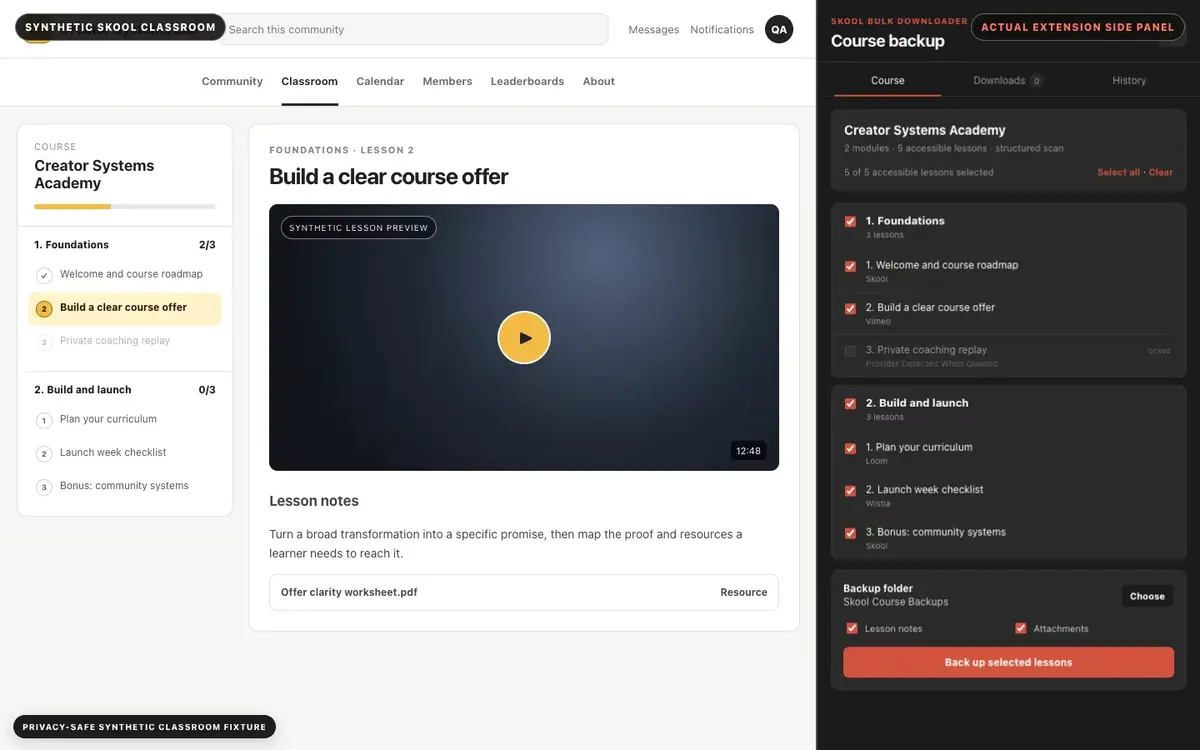
01
Open your authorized Skool classroom
Open a course your account can already access, then launch Skool Bulk Downloader from the browser toolbar.
Discover, select, and back up complete authorized Skool courses in their original order.
Skool Bulk Downloader helps you create an organized local backup of course material your Skool account is already permitted to access. Select an entire course, individual modules, or specific lessons, then preserve the original teaching order in predictable Course / Module / Lesson folders.
Compatible Skool-native, Loom, Vimeo, and Wistia videos can be saved alongside lesson text, resources, attachments, and a redacted backup report. YouTube lessons remain documented in information/link mode so the final report accurately distinguishes saved media from referenced content.
A durable manager works through the selected lessons one at a time and gives you pause, resume, retry, recovery, history, and completion controls. Compatible media processing stays on your device rather than passing through a SERP conversion server.

Secure checkout. Start downloading in minutes.
Built for structured backups of course content you are authorized to save.
Real progress, recovery, provider labels, and a final backup report.
Part of the SERP Apps Extensions Library.
Open the page, let the extension detect what is available, and save the file to your computer.
Open a course your account can already access, then launch Skool Bulk Downloader from the browser toolbar.
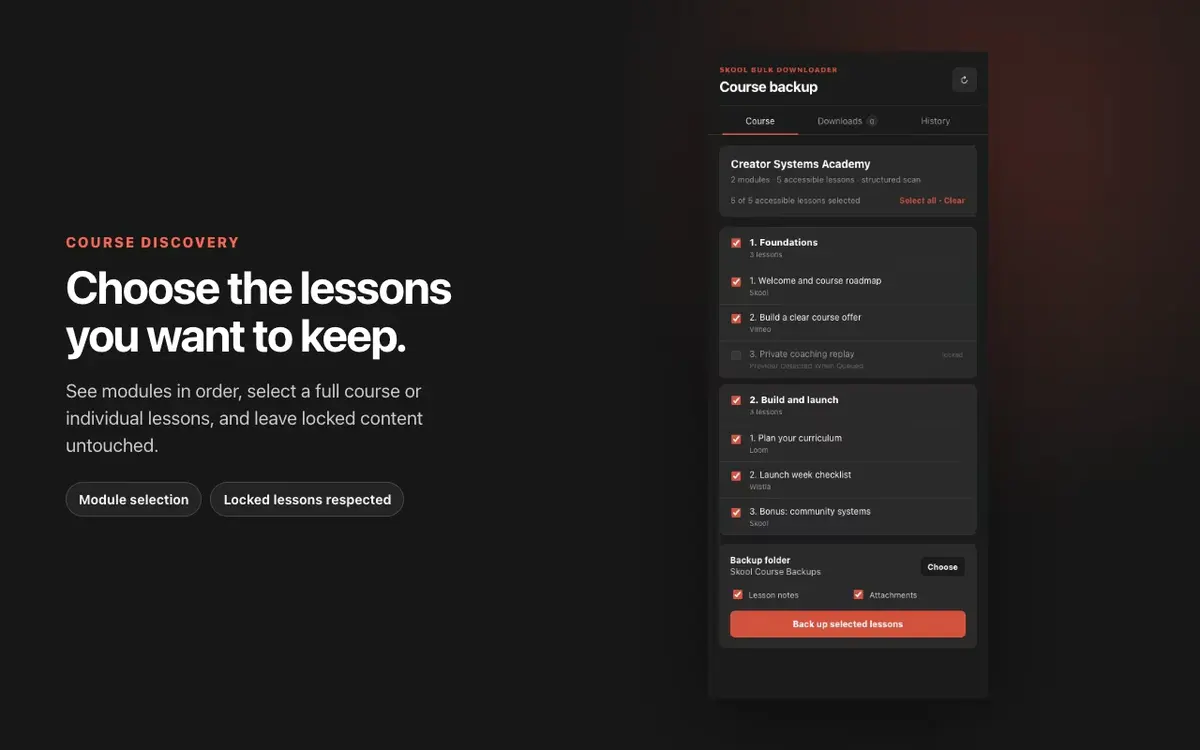
Review discovered modules and lessons, then select the whole course or only the sections you are permitted to save.
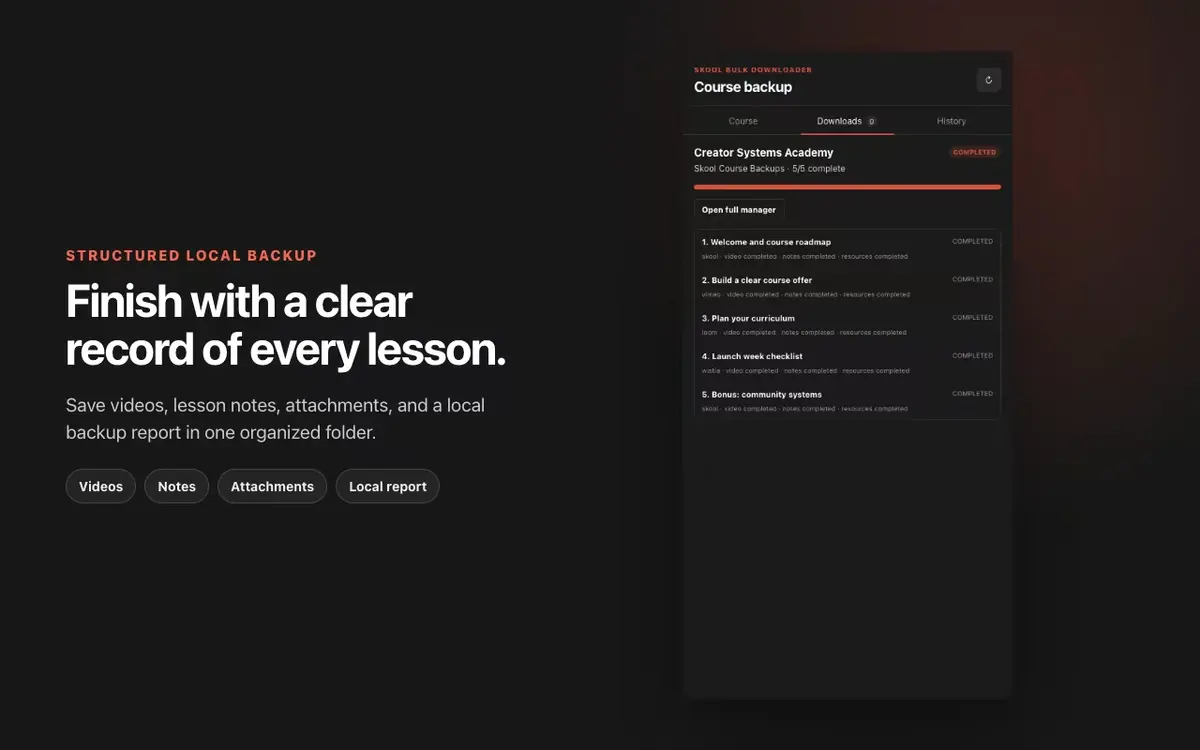
The manager works through the selection, records provider and status details, and finishes with an organized backup and report.
Short, practical feedback from people using Skool Bulk Downloader in real workflows.
I had several Skool courses I wanted to keep offline, and downloading everything individually would’ve taken forever. This handled the whole process without much effort.
Daniel Foster
Pretty straightforward to use. I selected the course, started the download, and left it running in the background. Everything was organised properly when it finished.
Marcus Reed
This saved me hours. I was expecting to sort through every lesson manually, but it downloaded the course structure and videos in one go.
Sophie Bennett
I had a small issue getting started, but support replied quickly and helped me fix it. It’s been working smoothly since then.
Nathan Brooks
Really useful before travelling. I downloaded my course content at home and could watch it later without relying on hotel Wi-Fi.
Emily Carter
Simple and does what I needed. The lesson names and folders stayed organised, which made the downloaded courses much easier to navigate.
Jason Miller
These comments and ratings were collected during our July 2026 customer survey and reviewed against support records before publication.
Core capabilities included in Skool Bulk Downloader.
Discovers accessible Skool courses, modules, and lessons in their original order.
Selects a whole course, specific modules, or individual lessons before the backup begins.
Saves compatible Skool-native, Loom, Vimeo, and Wistia video.
Records YouTube lessons in information/link mode instead of falsely marking them downloaded.
Preserves lesson text, resources, attachments, and an auditable backup report.
Processes one selected lesson at a time with visible provider and progress information.
Supports pause, resume, cancel, retry, history, and interrupted-job recovery.
Keeps compatible media processing local to your device.
Both workflows can be useful, but they solve different jobs.
Skool Bulk Downloader
Discovers the course structure and lets you select courses, modules, or lessons.
Single-video workflow
Starts from the one video currently open in the browser.
Skool Bulk Downloader
Preserves ordered Course / Module / Lesson folders and supporting lesson content.
Single-video workflow
Usually saves an individual media file without the surrounding course structure.
Skool Bulk Downloader
Provides durable job progress, pause, retry, recovery, history, and a final report.
Single-video workflow
Each lesson is handled as a separate manual action.
Skool Bulk Downloader
Best for an authorized multi-lesson backup that needs consistent organization.
Single-video workflow
Best when you only need the supported video already open on screen.
Available on major desktop browsers and operating systems used in day-to-day workflows.
Pick the browser build you need. When a direct GitHub release is available, you can grab the ZIP there.
Open the main product page to get the Chrome build while direct release links are being added.
Open the main product page to get the Edge build while direct release links are being added.
Open the main product page to get the Brave build while direct release links are being added.
Install from GitHub releases or your user dashboard. ZIP builds include the full desktop extension.
Every requested permission and the job it performs inside the extension.
Saves approved backup files to the location selected through the browser download workflow.
Discovers the active Skool classroom and keeps course jobs synchronized while the manager works through lessons.
Stores selections, progress, recovery information, history, and activation state locally in the browser.
Reads supported lesson structure and player information from pages your account can already access.
Processes compatible media without requiring the lesson tab to remain in the foreground.
Provides the responsive course selection and job manager beside the open Skool classroom.
Uses existing session access where a supported provider requires it to retrieve media already available to the signed-in user.
Allows limited access to Skool and supported provider domains required for course discovery and compatible media requests.
Better to know the boundaries up front than find out after checkout.
DRM-protected content and live streams are not supported.
Mobile browsers and Safari are not supported; Firefox support is coming soon.
The bulk scheduler intentionally processes one selected lesson at a time.
YouTube is information/link mode only in the bulk workflow.
You must already have permission to access and save the content.
Available quality depends on the source exposed by each lesson.
Keep exploring
Browse every category we support and jump directly into the tools that match your workflow.
23 categories are currently available.
Immediate Access
Product access begins after a successful checkout
Setup Guidance
Installation steps are provided for the supported package
Billing Shown Upfront
Review the selected billing interval before checkout
Create one organized course backup instead of repeatedly saving lessons by hand.
Keep permitted study material available during travel or unreliable internet access.
Retain the course structure and supporting context around each compatible video.
See exactly what completed, what needs attention, and what was information-only.
Avoid screen recording and command-line setup for supported course providers.